
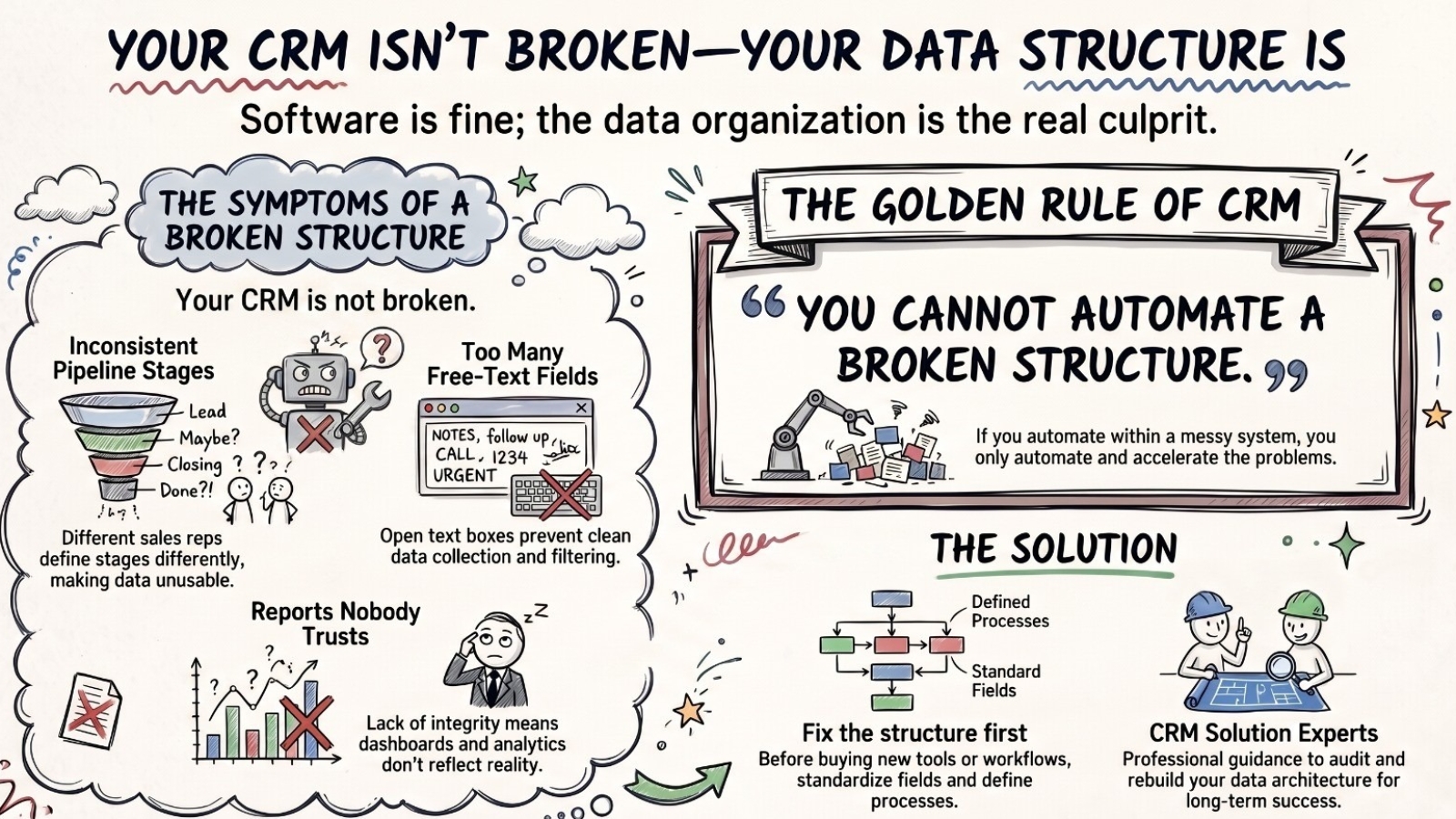
Your Pipedrive Is Not Broken. Your Data Structure Is.
Most Pipedrive problems aren't Pipedrive problems. They're data structure problems.
That distinction matters practically. If you diagnose a data structure problem as a software problem, you spend money on a new CRM or a new Pipedrive consultant to reconfigure the same broken logic - and the same issues appear again within six months. Because the new setup runs on the same bad structure.
This article covers what a broken CRM data structure actually looks like, why it makes Pipedrive automation fail before it starts, and exactly how to fix it - field by field, stage by stage.
What a Broken Pipedrive Setup Looks Like
A company reaches out because Pipedrive isn't working. Deals are stalling. Reports pull wrong numbers. The sales team has quietly stopped logging activity because the system doesn't reflect reality anyway. They want a Pipedrive consultant to fix it.
We audit the setup and find variations of the same things every time.
Signs your Pipedrive data structure is the problem, not the software:
- Pipeline stages that mean different things to different reps
- Reports nobody fully trusts - "the numbers are probably off"
- Free-text fields where structured dropdowns should be
- "Closed Won" used differently depending on who is logging
- Custom fields nobody remembers creating or knows the purpose of
- Duplicate contacts spread across multiple deals or organizations
- Activity logs incomplete for large parts of the pipeline
- Automations that fire for the wrong deals or skip valid ones
Every one of these is a symptom of a Pipedrive setup built once, quickly, without a clear model of how data would be used downstream - and then left to grow without anyone managing the structure as the business changed.
"Pipedrive is doing exactly what it was set up to do. The setup is the problem."
Why a Bad Data Structure Breaks Pipedrive Automation Before It Starts
This matters most when a company wants to add automation to Pipedrive - either through native automations, Make.com, or Zapier. Automation reads data and acts on it. If the data is inconsistent, the automation behaves inconsistently.
A deal stage trigger fires at the wrong time because different reps define "Proposal Sent" differently. A follow-up sequence fires for the wrong contacts because the industry field has 14 variations of the same value. A report shows closed deals trending down when actually the stage label changed mid-year and half the team is still using the old one.
You cannot automate a broken Pipedrive structure. You automate the problems in it - faster and at greater scale.
How to Run a Pipedrive Data Structure Audit
Before any Pipedrive reconfiguration or automation project, we run a structured audit. Here is the exact process we use in every Pipedrive consultation:
Step 1: Audit your pipeline stages
For each stage, write down in one sentence what must be verifiably true for a deal to be in that stage. If two people on your team would write different sentences for the same stage, the stage definition is broken. Merge stages that mean the same thing. Rename stages that are ambiguous.
Step 2: Audit your custom fields
Export a list of every custom field in Pipedrive across deals, contacts, and organizations. For each field, ask: Does it have a clear purpose? Is it populated by more than 50% of relevant records? Is it used in any report, filter, or automation? If the answer to all three is no, the field gets archived.
Step 3: Fix field types
Any field that will ever be filtered, reported on, or used as an automation condition must be a structured type - single select, multi select, or number. Free-text fields in those positions will break every downstream process you try to build. Common violations: Industry as free text. Deal size as free text. Region as free text.
Step 4: Standardize naming conventions
If "IT Services," "Information Technology," and "Technology - IT" are all options in the same Pipedrive field, every filter and segment built on that field is wrong. Run a deduplication pass across all single-select fields, choose one naming standard, and apply it to all existing records via bulk update.
Step 5: Define activity logging expectations
Decide which activities must be logged in Pipedrive for a deal to progress between stages. Build that requirement into the stage definition. Add Pipedrive automations that remind reps to log required activities before a stage change is allowed. Activity data is what makes pipeline reporting meaningful.
What Changes After the Pipedrive Data Audit
The most immediate outcome is that Pipedrive reports become trustworthy. When leadership asks about pipeline by industry, the answer is accurate. This alone changes how decisions get made.
The second outcome is behavioral. When Pipedrive is logically structured and the team understands how their inputs affect what they see downstream, they maintain data more accurately - not because they are more disciplined, but because the system makes sense and accurate input benefits them directly.
The third outcome is that every Pipedrive automation project becomes cheaper and faster. When the data structure is clean, integrations with Make.com, Zapier, Apollo, or any other tool work on the first build. When it is not, every integration project includes a hidden data cleanup phase - the most common reason Pipedrive implementation timelines slip.
Common Pipedrive Setup Mistakes We See in Every Consultation
Too many pipelines. Most companies need 1-2 pipelines. More than 3 usually means stages have been used to represent deal types rather than deal stages. Multiple pipelines multiply data inconsistency.
Rotten leads mixed with active pipeline. Leads that haven't been contacted in 90+ days sitting in early pipeline stages distort conversion metrics and make forecast reports meaningless. A consistent lost/archived policy fixes this immediately.
No deal assignment logic. When new deals are assigned manually or inconsistently, some reps have too many open deals to work. Pipedrive automation can enforce assignment logic based on territory, industry, or deal size - but only if the relevant fields are structured correctly.
Activities not linked to stages. If your pipeline has 6 stages and none of them require a logged activity to advance, you don't have a pipeline - you have a drag-and-drop wishlist. Stage progression should require evidence that lives in activity logs.
Frequently Asked Questions About Pipedrive Setup and CRM Data Structure
Why is my Pipedrive reporting showing wrong numbers?
Inaccurate Pipedrive reports are almost always a data structure problem. The most common causes: inconsistent stage definitions, free-text fields with inconsistent values used in filters, and duplicate records inflating contact or deal counts. A field audit and stage definition exercise typically resolves reporting accuracy within 2-3 weeks.
How do I clean up my Pipedrive CRM?
Start with the field audit: export all custom fields and remove any that are unused or have less than 50% population. Then standardize values in single-select fields using bulk update. Then review and merge duplicate contacts and organizations. Finally, archive deals with no activity in 180+ days. Doing all four in sequence typically reduces clutter by 30-50%.
What does a Pipedrive consultant actually audit?
A Pipedrive consultant audit covers: pipeline stage definitions and consistency, custom field types and population rates, duplicate record count and merge strategy, automation logic and trigger conditions, integration health (Make.com, Zapier, or native connections), activity logging patterns, and user adoption rates by rep. The output is a prioritized list of fixes ordered by impact on reporting accuracy and automation reliability.
How long does it take to fix Pipedrive data structure issues?
A basic Pipedrive data cleanup - field audit, stage redefinition, value standardization - typically takes 3-5 business days for a team of under 15 reps. Larger teams with more complex pipelines and historical data can run 2-3 weeks. The cleanup is always faster than the time the bad structure would have cost in failed automations, wrong reports, and manual reconciliation over the next 12 months.
Should I use Pipedrive automations or Make.com for my workflows?
Pipedrive's native automations are best for simple, single-step workflows that stay inside Pipedrive - sending a notification when a deal moves to a stage, creating a follow-up activity, or updating a field based on a trigger. Make.com is better when the workflow needs to cross into another tool, involves multiple steps, or requires conditional logic. For most B2B sales teams, the right answer is both: native automations for internal Pipedrive logic, Make.com for anything that touches an external system.
Tal Shapiro - CRM Solution Experts
COO background. Builds B2B automation systems - CRMs, ERPs, e-commerce, and calling tools connected into one working whole. Pipedrive Gold Partner. Helping companies worldwide stop losing deals to broken processes.
Want a Pipedrive Audit Before You Build Anything Else?
We start every engagement with a structured data audit. Book a free discovery call and we'll look at your Pipedrive setup together.
Book a Free Discovery Call